

When I adapted the Doubleur block for Retraceur, my goal was to provide a simple way to publish bilingual posts without relying on a full-featured translation plugin or making the writing experience more complicated.
Since its first release, Doubleur has allowed authors to write an English version of their content while keeping everything in a single post. That’s the workflow I use for the articles on this blog that I want to make available to a broader audience.
However, one inconsistency remained: while the post’s content could be translated, its title always stayed in the site’s primary language. It wasn’t a major issue, but it was noticeable enough that I eventually decided to fix it.
Version 1.3.0 introduces exactly that capability: translating the article title as well.
The workflow is almost unchanged
At first glance, the Doubleur block works exactly as before. One section still contains the blocks for the primary-language version of the post, while another contains their English counterparts.
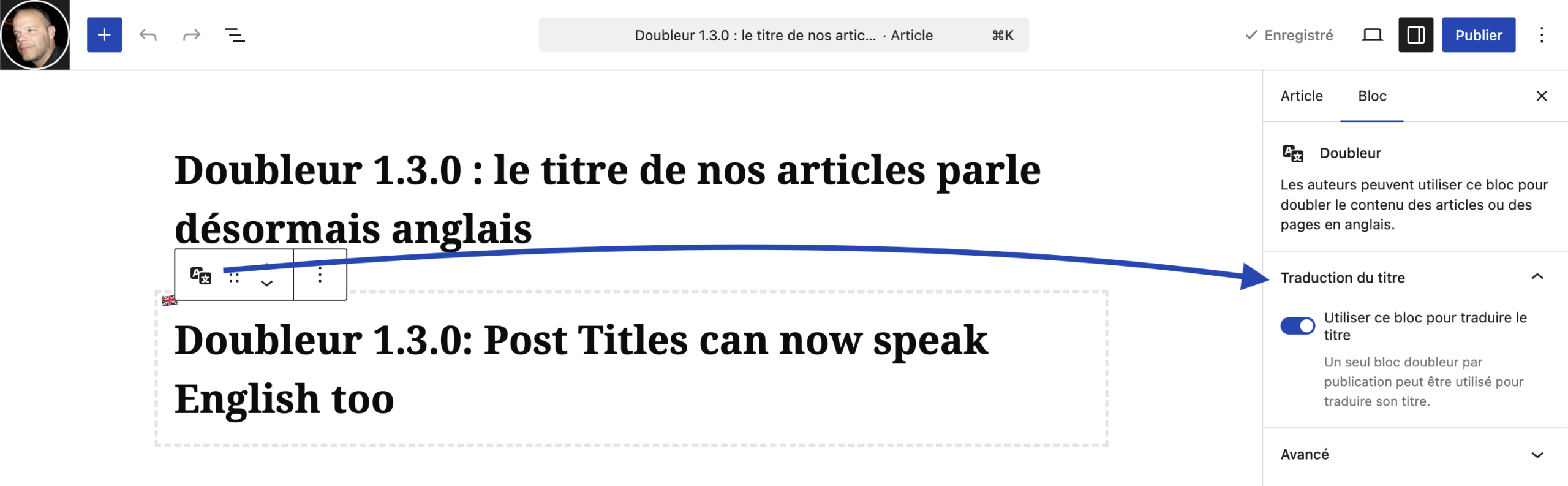
The new feature is available from the block Inspector. A new setting lets you set one Doubleur block as the translation for the Post Title instead of part of the post’s content.
Naturally, this option can only be used once per post—it has only one title. Every other Doubleur block continues to work exactly as before, translating the post content.
The screenshot below shows where this new option is located in the block Inspector.
Integrated with Retraceur’s OpenGraph API
This feature becomes even more useful thanks to Retraceur’s built-in OpenGraph API (it was introduced in the 3.0.0 version).
Whenever an English version of an article is available, the translated title is now automatically used to populate the following metadata <meta property="og:title" ...>.
As a result, social platforms and other services that rely on OpenGraph metadata now receive a title that matches the language of the translated content. Once the translated title has been defined, everything else happens automatically.
Building software by being its first user
This feature started with a very simple need. I use Retraceur to publish this blog, and I use Doubleur whenever I want to provide an English version of an article. That’s generally how I like to improve Retraceur and its plugins: by being their first user.
I don’t build features because they might be useful someday. I build them because I miss them while writing, and then I make them available to everyone using Retraceur.
I believe this approach helps keep the project both coherent and authentic. Every new feature begins as a real-world need before becoming part of the platform.
A good way to test Retraceur 4.0.0
This release also served another purpose. As I explained in the post announcing the Retraceur 4.0.0-beta1, I’m currently working on a new update mechanism for blocks and extensions.
Releasing Doubleur 1.3.0 gave me the opportunity to test that infrastructure under real-world conditions. Beyond the feature itself, this release also helps validate the update system that will ship with Retraceur 4.0.0.
I enjoy coding this way, where solving a practical problem also helps improve the platform itself. This makes even more sense when our resources are limited!
How to enjoy it on your website ?
To enjoy this block in your Retraceur powered Website, first download it using the doubleur.zip file from the block’s Assets section of its latest release page. Then go to your Retraceur Dashboard and find the Blocks Administration Screen to upload and activate it. Please, read this documentation page for more information about how to do so.

Conversation
Rejoignez la conversation depuis Bluesky